This is a monumental update, literally our biggest v2 update yet, and it represents a transformative leap in molecular visualization and creation. After introducing our first 3D tool with measurements in v2.2, we're thrilled to unveil 3D molecular building in v2, alongside revolutionary web-based workspace previews that make Nanome more accessible than ever before.

The Ligand Builder Tool: Molecular Construction Reimagined

Building molecules is better than ever. While v1 allowed for more free-form building with reliance on minimization, v2 introduces precision-based construction with fixed bond lengths and angles. The new Ligand Builder features three fundamental geometry modes: linear, trigonal planar, and tetrahedral, ensuring chemically accurate structures from the start.
Simply click on an atom to reveal guided placement options based on your selected geometry, with automatic rotation for proper bond angles. Build your molecule atom by atom, add fragments from our library, and leverage full undo/redo support from day one so you can experiment freely and correct mistakes instantly without losing your work. Minimization is available today through MARA tools and workflows, which can grab ligands from workspaces, run minimization, and push results back to v2. Native in-app minimization is on the roadmap, and the builder is designed for seamless integration between XR building and computational refinement.
Web-Based 3D Workspace Preview: Nanome Everywhere

Remember the 2D mode on Windows PCs from v1? We've completely reimagined accessibility. You can now preview your full VR workspace directly from the web—complete with interactive 3D navigation, scene switching, structure zooming, and POV control. This means complete hardware support across all devices, from high-end workstations to mobile phones and tablets. Nanome has never been more accessible, bringing immersive molecular visualization and collaboration to any device with a browser.
The Selection Tool: Precision Meets Intuition

Our new Selection Tool transforms how you interact with molecular structures in 3D space. Select atoms, residues, or entire regions with natural hand movements, then instantly convert selections into custom components. Hovering reveals contextual information, making structural analysis more intuitive than ever.
The Sequence Menu: A Game-Changer for Structure Navigation
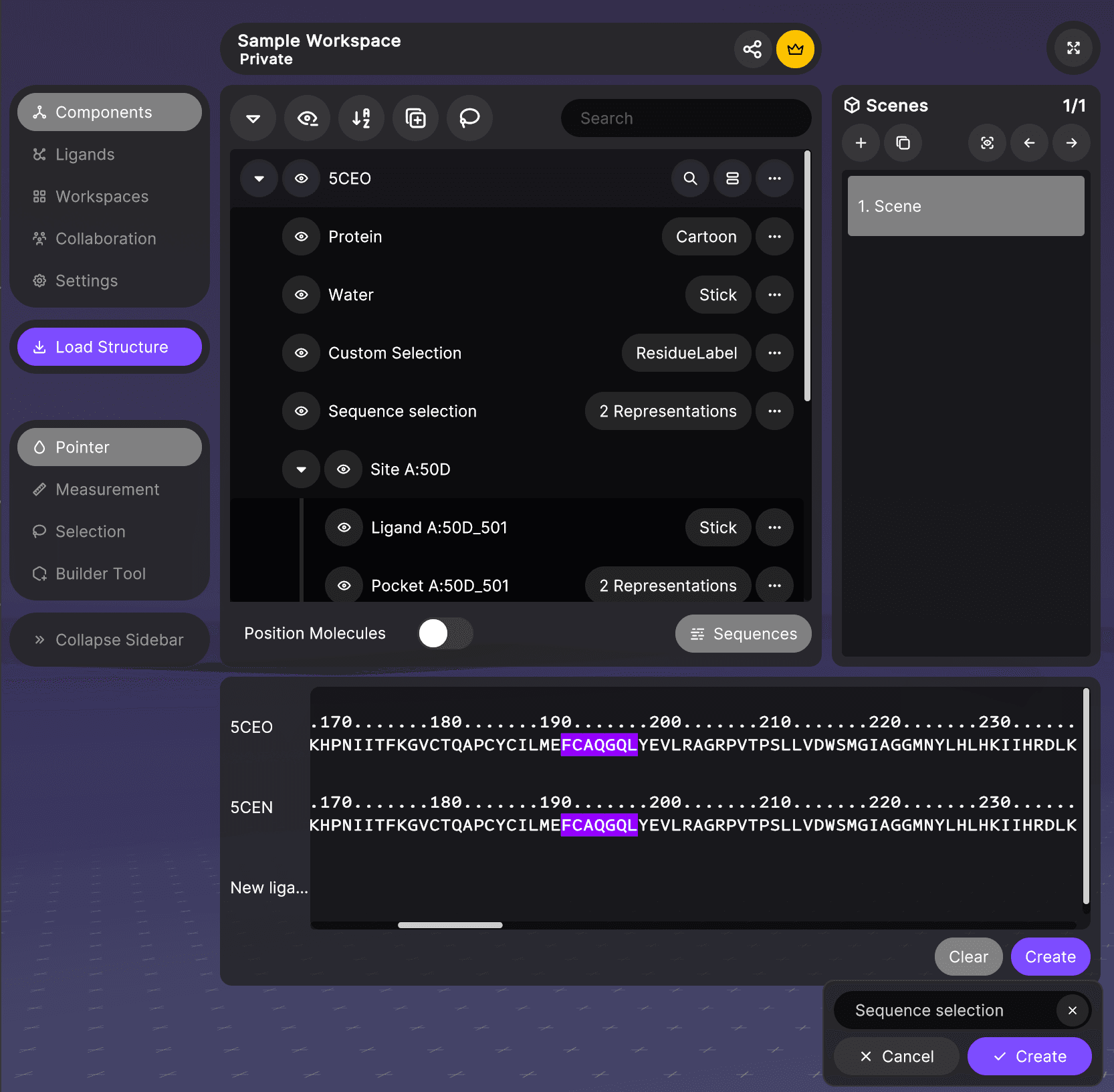
The new Sequence Menu is a breakthrough for navigating and understanding protein structures. This interactive sequence viewer displays the primary structure of your molecules with unprecedented clarity. Simply click and drag to select sequence spans—whether you need a specific alpha helix, a binding pocket, or a functional domain—and instantly convert those selections into custom components.
For structural biologists and medicinal chemists working with protein-ligand complexes, this means you can now rapidly identify and isolate regions of interest directly from the sequence. No more hunting through 3D space or writing complex selection scripts. See an interesting motif in the sequence? Select it, create a component, and immediately focus your analysis. This seamless connection between sequence and structure fundamentally changes how you explore biomolecules in VR.
Property Annotations: Data-Driven Design in 3D Space

Transform how you visualize structure-activity relationships with our new 3D property annotations. Any property from the ligand menu can now be displayed as floating labels directly in your workspace. Want to see LogP values hovering above each compound? Need to track the number of hydrogen bonds in the binding pocket? Comparing molecular weights across a series? This feature has you covered.
For medicinal chemists engaged in lead optimization, this means instant visual access to critical molecular properties without menu diving. Imagine walking through a virtual room where each molecule displays its binding affinity, ADMET properties, or synthetic accessibility score—all customizable with full color support for quick visual categorization. During collaborative sessions, teams can now literally see the data that drives decisions, making SAR discussions more intuitive and productive. Properties update in real-time as you modify structures, creating a truly dynamic environment for molecular design.
Enhanced Grab Mechanics: Natural Interaction at Any Distance

We've completely reimagined how you manipulate structures from a distance. V1 users may remember the cumbersome process of grabbing a distant structure then using the joystick to push and pull it closer. That's history. Now, simply point at any structure and grab, and it comes directly to your hand. The system is smart enough to know when you're inside a structure and prevents unwanted movement, maintaining your orientation when it matters most.
This seemingly simple change has profound implications for workflow efficiency. Navigate large protein complexes, compare multiple conformations, or arrange structures for presentation—all with natural, intuitive gestures. And for those who prefer the classic controls, this feature can be disabled in the settings menu. It's all about giving you the control you need, the way you want it.
Notable Enhancements
Visual and Interaction Improvements
- Wireframe highlighting when hovering over structures in UI or 3D space
- Haptic feedback for all UI interactions, enhancing the tactile experience
- Hydrogen visibility modes for customizable structural views
- Multi-model text annotations with full color support
- Site components support with dedicated cross-entry component organization
- Improved UI contrast with clearer item separation and better collapsed layouts
Building and Editing Features
- Room-wide autoplay for cycling through models collaboratively
- Build/Replace/Delete modes with contextual visual feedback
- Elements and Fragments library for rapid construction
- Smart valence checking prevents chemically impossible structures
- Persistent undo/redo throughout the building process
Collaboration and Accessibility
- Instant reconnection when resuming the app after connection loss
- PDB export directly from entries
- Embedded 3D preview on workspace web pages
- Dramatic performance improvements with intelligent rendering optimization
Bug Fixes and Stability
We've squashed numerous bugs including fixes for hydrogen bonding in nucleic acids, surface rendering inconsistencies, UI raycast behavior, workspace invitations, and permission management. The complete list includes over 50 targeted fixes ensuring a stable, reliable experience.
Looking Forward
Version 2.3.0 represents not just an update, but a platform evolution. We're building the foundation for even deeper integration between immersive visualization and computational chemistry, including native minimization and direct MARA tool triggering within XR. As we continue to blur the lines between web and XR experiences, we're committed to making powerful molecular tools accessible to scientists everywhere, on any device.
Experience the future of molecular design today. Request a demo or early access to v2 at https://nanome.ai/demo/.
Happy building!
The Nanome Team